DTC B1277:11 [ELECTRICAL SUPPLY UNIT (ESU)]
| Description |
Back-up light circuit malfunction |
| Detection condition |
|
| Fail-safe |
Not applicable |
| Possible cause |
|
| |
|
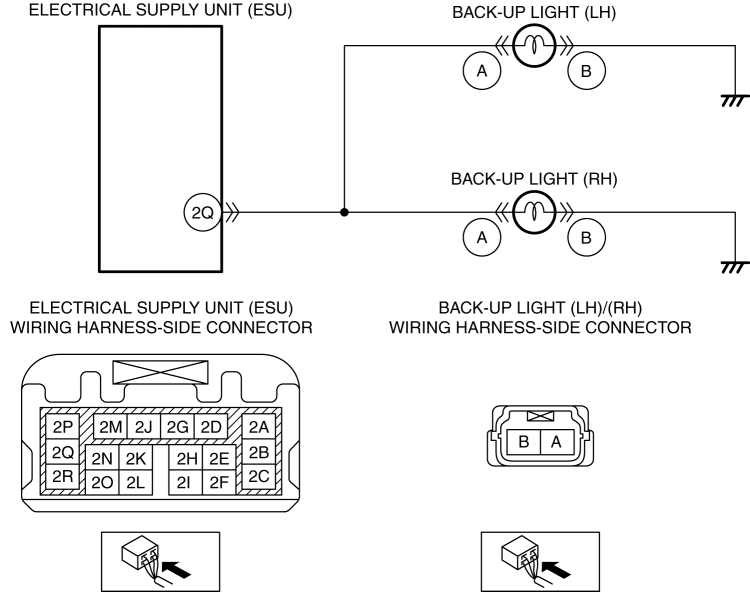
| Step |
Inspection |
Action |
|
| 1 |
VISUALLY INSPECT BACK-UP LIGHT BULB (LH)
|
Yes |
Go to the next step. |
| No |
Replace the back-up light bulb (LH), then go to Step 7. |
||
| 2 |
VISUALLY INSPECT BACK-UP LIGHT BULB (RH)
|
Yes |
Go to the next step. |
| No |
Replace the back-up light bulb (RH), then go to Step 7. |
||
| 3 |
INSPECT BACK-UP LIGHT (LH) CONNECTOR CONDITION
|
Yes |
Go to the next step. |
| No |
Repair or replace the connector, then go to Step 7. |
||
| 4 |
INSPECT BACK-UP LIGHT (RH) CONNECTOR CONDITION
|
Yes |
Go to the next step. |
| No |
Repair or replace the connector, then go to Step 7. |
||
| 5 |
INSPECT ELECTRICAL SUPPLY UNIT (ESU) CONNECTOR CONDITION
|
Yes |
Go to the next step. |
| No |
Repair or replace the connector, then go to Step 7. |
||
| 6 |
INSPECT BACK-UP LIGHT CONTROL CIRCUIT FOR SHORT TO GROUND
|
Yes |
Refer to the wiring diagram and verify whether or not there is a common connector between the following terminals:
Go to the next step. |
| No |
Go to the next step. |
||
| 7 |
VERIFY THAT REPAIRS HAVE BEEN COMPLETED
|
Yes |
Repeat the inspection from Step 1.
Go to the next step. |
| No |
Go to the next step. |
||
| 8 |
VERIFY IF OTHER DTCs DISPLAYED
|
Yes |
Repair or replace the malfunctioning part according to the applicable DTC troubleshooting. |
| No |
DTC troubleshooting completed. |
||