< Previous
Next >
WIPER AND WASHER SWITCH INSPECTION
Wiper Switch
1. Disconnect the negative battery cable. (See NEGATIVE BATTERY CABLE DISCONNECTION/CONNECTION.)
2. Remove the column cover. (See COLUMN COVER REMOVAL/INSTALLATION.)
3. Remove the wiper and washer switch. (See WIPER AND WASHER SWITCH REMOVAL/INSTALLATION.)
4. Verify that the continuity between the wiper and washer switch terminals is as indicated in the table.
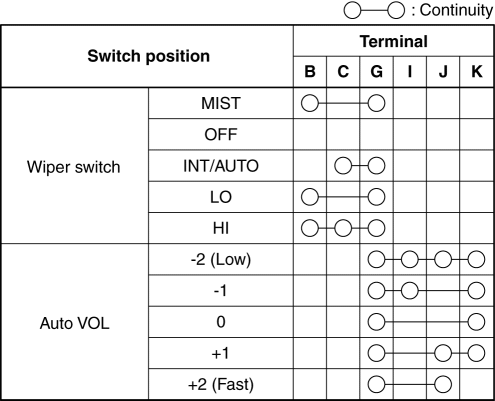
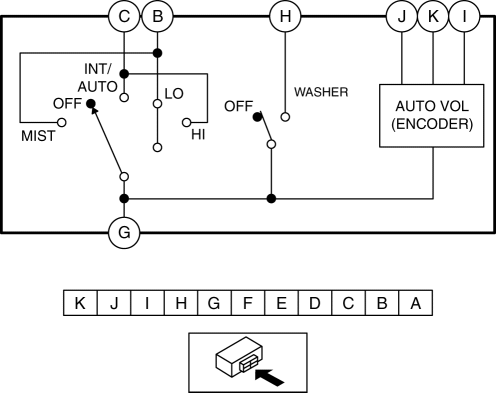
If the continuity is not as indicated in the table, replace the wiper and washer switch. (See WIPER AND WASHER SWITCH REMOVAL/INSTALLATION.)
Washer Switch
1. Disconnect the negative battery cable. (See NEGATIVE BATTERY CABLE DISCONNECTION/CONNECTION.)
2. Remove the column cover. (See COLUMN COVER REMOVAL/INSTALLATION.)
3. Remove the wiper and washer switch. (See WIPER AND WASHER SWITCH REMOVAL/INSTALLATION.)
4. Verify that the continuity between the wiper and washer switch terminals is as indicated in the table.
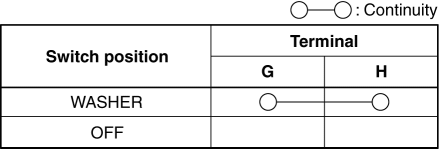
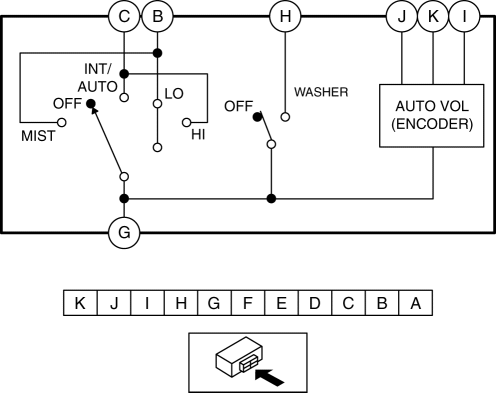
< Previous Next >
If the continuity is not as indicated in the table, replace the wiper and washer switch. (See WIPER AND WASHER SWITCH REMOVAL/INSTALLATION.)