DTC B1D07:13 [BCM]
| Description |
Turn light (RH) circuit malfunction |
| Detection condition |
|
| Fail-safe |
Not applicable |
| Possible cause |
|
| |
|
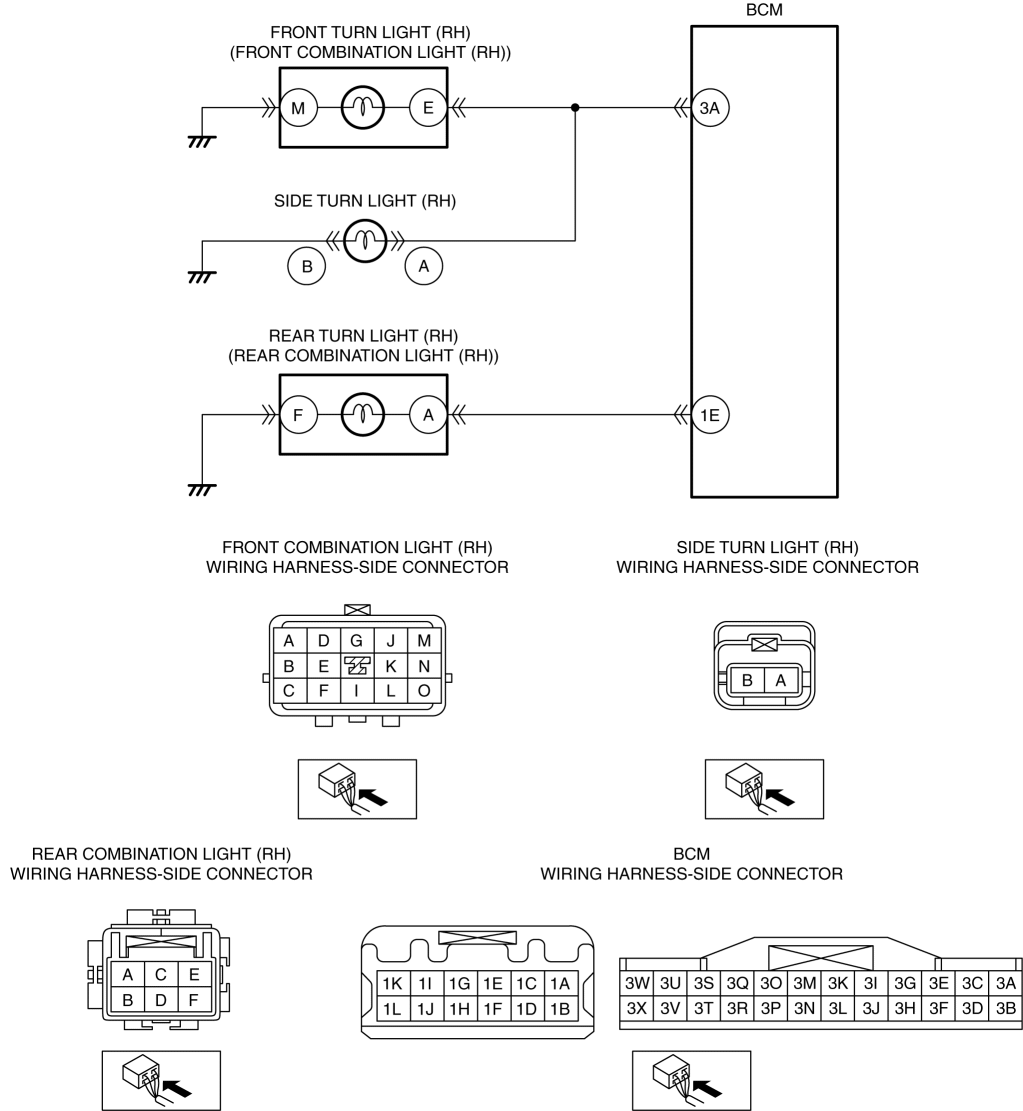
| Step |
Inspection |
Action |
|
| 1 |
VERIFY BCM DTCs AGAIN
|
Yes |
Go to the next step. |
| No |
Go to Step 20. |
||
| 2 |
DETERMINE MALFUNCTIONING LIGHT
|
Yes |
All lights do not flash or continue to be illuminated:
Front turn light (RH) and side turn light (RH) does not flash or continue to be illuminated:
Rear turn light (RH) do not flash or continue to be illuminated:
|
| No |
Go to Step 19. |
||
| 3 |
INSPECT BCM CONNECTOR CONDITION
|
Yes |
Go to Step 19. |
| No |
Repair or replace the connector, then go to Step 19. |
||
| 4 |
VISUALLY INSPECT FRONT TURN LIGHT BULB (RH)
|
Yes |
Go to the next step. |
| No |
Replace the front turn light bulb (RH), then go to Step 19. |
||
| 5 |
INSPECT FRONT COMBINATION LIGHT (RH) CONNECTOR CONDITION
|
Yes |
Go to the next step. |
| No |
Repair or replace the connector, then go to Step 19. |
||
| 6 |
INSPECT FRONT TURN LIGHT (RH) GROUND CIRCUIT FOR OPEN CIRCUIT
|
Yes |
Go to the next step. |
| No |
Refer to the wiring diagram and verify whether or not there is a common connector between front combination light (RH) terminal M and body ground.
Go to Step 19. |
||
| 7 |
INSPECT SIDE TURN LIGHT (RH) CONNECTOR CONDITION
|
Yes |
Go to the next step. |
| No |
Repair or replace the connector, then go to Step 19. |
||
| 8 |
INSPECT SIDE TURN LIGHT BULB (RH)
|
Yes |
Go to the next step. |
| No |
Replace the side turn light (RH), then go to Step 19. |
||
| 9 |
INSPECT SIDE TURN LIGHT (RH) GROUND CIRCUIT FOR OPEN CIRCUIT
|
Yes |
Go to the next step. |
| No |
Refer to the wiring diagram and verify whether or not there is a common connector between side turn light (RH) terminal B and body ground.
Go to Step 19. |
||
| 10 |
INSPECT BCM CONNECTOR CONDITION
|
Yes |
Go to the next step. |
| No |
Repair or replace the connector, then go to Step 19. |
||
| 11 |
INSPECT TURN LIGHT (RH) CONTROL CIRCUIT FOR SHORT TO POWER SUPPLY
|
Yes |
Go to the next step. |
| No |
Refer to the wiring diagram and verify whether or not there is a common connector between the following terminals:
Go to Step 19. |
||
| 12 |
INSPECT TURN LIGHT (RH) CONTROL CIRCUIT FOR OPEN CIRCUIT
|
Yes |
Go to Step 19. |
| No |
Refer to the wiring diagram and verify whether or not there is a common connector between the following terminals:
Go to Step 19. |
||
| 13 |
VISUALLY INSPECT REAR TURN LIGHT BULB (RH)
|
Yes |
Go to the next step. |
| No |
Replace the rear turn light bulb (RH), then go to Step 19. |
||
| 14 |
INSPECT REAR COMBINATION LIGHT (RH) CONNECTOR CONDITION
|
Yes |
Go to the next step. |
| No |
Repair or replace the connector, then go to Step 19. |
||
| 15 |
INSPECT REAR TURN LIGHT (RH) GROUND CIRCUIT FOR OPEN CIRCUIT
|
Yes |
Go to the next step. |
| No |
Refer to the wiring diagram and verify whether or not there is a common connector between rear combination light (RH) terminal F and body ground.
Go to Step 19. |
||
| 16 |
INSPECT BCM CONNECTOR CONDITION
|
Yes |
Go to the next step. |
| No |
Repair or replace the connector, then go to Step 19. |
||
| 17 |
INSPECT REAR TURN LIGHT (RH) CONTROL CIRCUIT FOR SHORT TO POWER SUPPLY
|
Yes |
Go to the next step. |
| No |
Refer to the wiring diagram and verify whether or not there is a common connector between rear combination light (RH) terminal A and BCM terminal 1E.
Go to Step 19. |
||
| 18 |
INSPECT REAR TURN LIGHT (RH) CONTROL CIRCUIT FOR OPEN CIRCUIT
|
Yes |
Go to the next step. |
| No |
Refer to the wiring diagram and verify whether or not there is a common connector between rear combination light (RH) terminal A and BCM terminal 1E.
Go to the next step. |
||
| 19 |
VERIFY THAT REPAIRS HAVE BEEN COMPLETED
|
Yes |
Repeat the inspection from Step 1.
Go to the next step. |
| No |
Go to the next step. |
||
| 20 |
VERIFY IF OTHER DTCs DISPLAYED
|
Yes |
Repair or replace the malfunctioning part according to the applicable DTC troubleshooting. (See DTC TABLE [BCM].) |
| No |
DTC troubleshooting completed. |
||