DTC U3003:16 [BCM]
| Description |
BCM power supply voltage low input |
| Detection condition |
|
| Fail-safe |
Not applicable |
| Possible cause |
|
| |
|
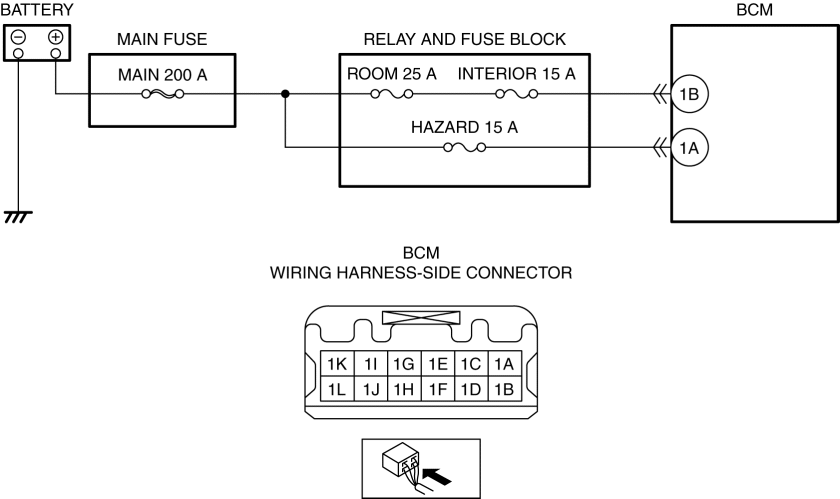
| Step |
Inspection |
Action |
|
| 1 |
VERIFY BCM DTCs AGAIN
|
Yes |
Go to the next step. |
| No |
Go to Step 8. |
||
| 2 |
VERIFY PCM DTCs
|
Yes |
Repair or replace the malfunctioning part according to the applicable DTC troubleshooting. |
| No |
Go to the next step. |
||
| 3 |
INSPECT BATTERY
|
Yes |
Go to the next step. |
| No |
Recharge or replace the battery, then go to Step 7. (See BATTERY RECHARGING.) |
||
| 4 |
INSPECT GENERATOR
|
Yes |
Go to the next step. |
| No |
Replace the generator, then go to Step 7. |
||
| 5 |
INSPECT BCM CONNECTOR CONDITION
|
Yes |
Go to the next step. |
| No |
Repair or replace the connector, then go to Step 7. |
||
| 6 |
VERIFY BCM POWER SUPPLY VOLTAGE
|
Yes |
Go to the next step. |
| No |
Inspect the INTERIOR 15 A fuse, ROOM 25 A fuse, HAZARD 15 A fuse and MAIN 200 A fuse.
Go to the next step. |
||
| 7 |
VERIFY THAT REPAIRS HAVE BEEN COMPLETED
|
Yes |
Repeat the inspection from Step 1.
Go to the next step. |
| No |
Go to the next step. |
||
| 8 |
VERIFY IF OTHER DTCs DISPLAYED
|
Yes |
Repair or replace the malfunctioning part according to the applicable DTC troubleshooting. (See DTC TABLE [BCM].) |
| No |
DTC troubleshooting completed. |
||