ANY OF THE FOLLOWING LIGHTS REMAIN ILLUMINATED: (ABS WARNING LIGHT, TCS/DSC INDICATOR LIGHT AND/OR DSC OFF INDICATOR LIGHT) [DYNAMIC STABILITY CONTROL (DSC)]
| 2 |
Any of the following lights remain illuminated: (ABS warning light, TCS/DSC indicator light and/or DSC OFF indicator light) |
| POSSIBLE CAUSE |
|
| STEP |
INSPECTION |
ACTION |
|
| 1 |
CONFIRM DSC HU/CM DTC
|
Yes |
Go to the applicable DTC inspection. (See DTC INSPECTION [DSC HU/CM].) |
| No |
Go to the next step. |
||
| 2 |
VERIFY IF MALFUNCTION IS IN DSC HU/CM CONNECTOR FOR POOR CONNECTION OR ELSEWHERE
|
Yes |
Inspect the DSC HU/CM connector or terminal. (poor connection intermittently)
|
| No |
Go to the next step. |
||
| 3 |
INSPECT BATTERY VOLTAGE
|
Yes |
Go to the next step. |
| No |
Recharge the battery and inspect the charging system. (See BATTERY INSPECTION.) (See GENERATOR INSPECTION [SKYACTIV-G 2.0].)
|
||
| 4 |
VERIFY IF MALFUNCTION IS IN CHARGING SYSTEM OR ELSEWHERE
|
Yes |
Go to the next step. |
| No |
Inspect the charging system (drive belt, generator). (See DRIVE BELT INSPECTION [SKYACTIV-G 2.0].)
|
||
| 5 |
INSPECT CONNECTION OF DSC HU/CM CONNECTOR
|
Yes |
Go to the next step. |
| No |
Connect the DSC HU/CM connector securely, then go to the next step. |
||
| 6 |
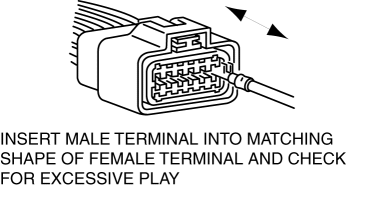
INSPECT CONNECTION OF CONNECTOR TERMINAL
|
Yes |
Repair the poor connection location of the terminal. |
| |
No |
Go to the next step. |
|
| *7 |
VERIFY IF MALFUNCTION IS IN WIRING HARNESS (BETWEEN DSC HU/CM POWER SUPPLY AND DSC HU/CM FOR CONTINUITY) OR ELSEWHERE
|
Yes |
Go to the next step. |
| No |
Refer to the wiring diagram and verify whether or not there is a common connector between DSC HU/CM terminal Q (wiring harness-side) and ignition switch.
|
||
| *8 |
VERIFY IF MALFUNCTION IS IN WIRING HARNESS (BETWEEN DSC HU/CM AND GROUND FOR CONTINUITY) OR ELSEWHERE
|
Yes |
Replace the DSC HU/CM. (open circuit in the DSC HU/CM) |
| No |
Repair or replace the wiring harness for a possible open circuit and poor contact at the ground point. |
||
| 9 |
CONFIRM PCM DTCs
|
Yes |
Go to the applicable DTC inspection. |
| No |
Go to the next step. |
||
| 10 |
VERIFY IF MALFUNCTION CAUSED BY INITIALIZATION PROCEDURE FOR MODULE NOT PERFORMED
|
Yes |
Go to the next step. |
| No |
Perform the initialization procedure. |
||
| 11 |
CONFIRM INSTRUMENT CLUSTER DTC
|
Yes |
Go to the applicable DTC inspection. |
| No |
Replace the instrument cluster. |
||
< Previous Next >
When performing an asterisked (*) troubleshooting inspection, shake the wiring harness and connectors while doing the inspection to discover whether poor contact points are the cause of any intermittent malfunctions. If there is a problem, verify that connectors, terminals and wiring harnesses are connected correctly and undamaged.