DTC B1417:11/B1417:12/B1417:29/B1417:2B/B1417:4A/B1417:87/B1417:96 [SAS CONTROL MODULE (TWO-STEP DEPLOYMENT CONTROL SYSTEM)]
| System malfunction location |
|
| Detection condition |
WARNING:
|
| Fail-safe function |
Not applicable |
| Possible cause |
|
| |
|
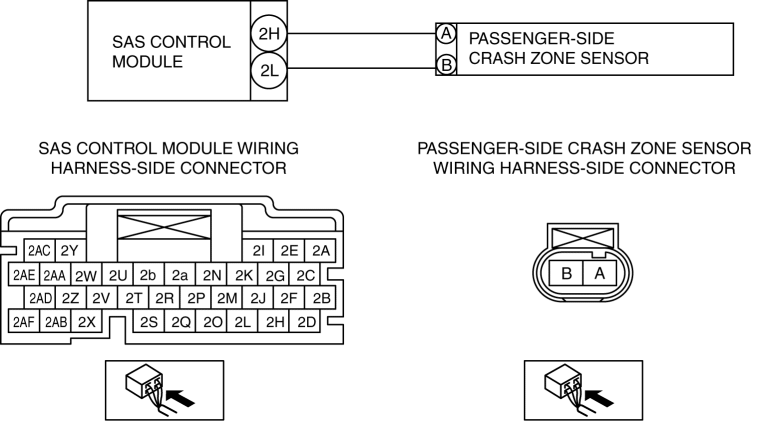
Diagnostic Procedure
| Step |
Inspection |
Action |
|
| 1 |
INSPECT PASSENGER-SIDE CRASH ZONE SENSOR WARNING:
|
Yes |
Go to the next step. |
| No |
Correctly install the passenger-side crash zone sensor. (See CRASH ZONE SENSOR REMOVAL/INSTALLATION [TWO-STEP DEPLOYMENT CONTROL SYSTEM].) Then go to the next step. |
||
| 2 |
INSPECT PASSENGER-SIDE CRASH ZONE SENSOR CONNECTOR
|
Yes |
Replace the malfunction part, then go to step 6. |
| No |
Go to the next step. |
||
| 3 |
INSPECT PASSENGER-SIDE CRASH ZONE SENSOR CIRCUIT FOR SHORT TO GROUND
NOTE:
|
Yes |
Refer to the wiring diagram and verify whether or not there is a common connector between SAS control module terminal and passenger-side crash zone sensor terminal.
Go to Step 6. |
| No |
Go to the next step. |
||
| 4 |
INSPECT PASSENGER-SIDE CRASH ZONE SENSOR CIRCUIT FOR OPEN CIRCUIT
NOTE:
|
Yes |
Go to the next step. |
| No |
Refer to the wiring diagram and verify whether or not there is a common connector between SAS control module terminal and passenger-side crash zone sensor terminal.
Go to Step 6. |
||
| 5 |
INSPECT PASSENGER-SIDE CRASH ZONE SENSOR CIRCUIT FOR SHORT TO POWER SUPPLY
NOTE:
|
Yes |
Replace the passenger-side crash zone sensor, then go to the next step. (See CRASH ZONE SENSOR REMOVAL/INSTALLATION [TWO-STEP DEPLOYMENT CONTROL SYSTEM].) |
| No |
Refer to the wiring diagram and verify whether or not there is a common connector between SAS control module terminal and passenger-side crash zone sensor terminal.
Go to the next step. |
||
| 6 |
PERFORM SAS CONTROL MODULE DTC INSPECTION
|
Yes |
Repeat the inspection from Step 1.
|
| No |
DTC troubleshooting completed. |
||